Tuesday, December 6, 2011

Monday, December 5, 2011
2013 PROMO: Groups for virtual worlds in Facebook
Groups for virtual worlds in Facebook
-
 -
-
-

- These are Facebook groups that I am in and post to when I have relevant content. These groups indicate an interest in virtual worlds, but not specifically in Second Life.
- The descriptions and member counts here are take directly from the descriptions and counts in Facebook.
- This list is incomplete. If you would like to add to it, post the link and the description in the comments below.
2013 ART: VIDEO: Gamification 'Second Libations' Art as a game
Art as a game. Or a game as art. You be the judge.
-
Haveit Neox's 'Second Libations'
-

-
Haveit Neox's 'Second Libations'
-

Enter the pyramid
-
-
Sunday, December 4, 2011

2013 1stHELP: Linden realms. Starting Second Life as a game.
"How do you play this game?"
An answer at last. Along with just-in-time learning.
-

Many people come into Second Life expecting a game. Actually, there are a lot of games. The Destination Guide lists about 37 in its Games section. But now Linden Lab has developed a new game, specifically for new people.
-
Not just to entertain new people. To create a learning environment for building the skills that are important for enjoying Second Life.
-
Destinations
Linden Realms
Move
You can look around without moving. I call that "zoom and roam your camera." Here's how:
-
Just-in-time instructional design:
An answer at last. Along with just-in-time learning.
-

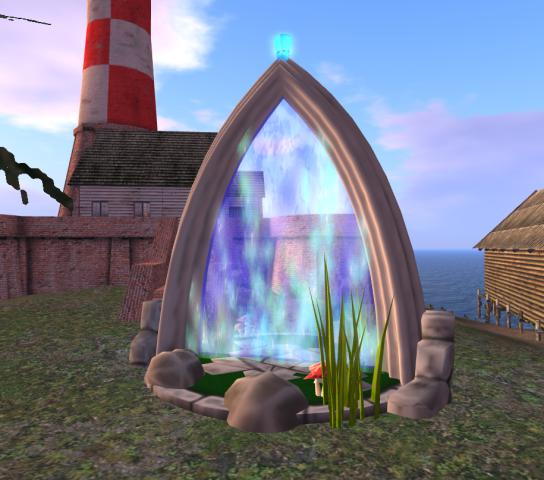
Portal to Linden Realms
A call for help
-Many people come into Second Life expecting a game. Actually, there are a lot of games. The Destination Guide lists about 37 in its Games section. But now Linden Lab has developed a new game, specifically for new people.
-
Not just to entertain new people. To create a learning environment for building the skills that are important for enjoying Second Life.
-
Destinations
Linden Realms
-
Tips- Linden Realms Frequently Asked Questions
- You will want sound effects on. Preferences button (gears)
- You will want to know how to look around
- You don't really get killed -- you just get teleported to a resurrection circle.
Move
- Double-click on the place you want to go (on the ground or on the map).
- Walk: press the up arrow key.
- Run: Press Ctrl r.
- Turn: press the arrow key pointing in the turn direction
- Sit: Right click on the object., select sit. Note Stand up button
- Map: Open, locate places, double click to go. Map button (folded paper)
You can look around without moving. I call that "zoom and roam your camera." Here's how:
- Put your cursor on what you want in the center of the picture.
- Press Alt and hold it down. The cursor will change to a rectangle with a plus sign in it.
- Scroll back and forth with the mouse scroll wheel;
- Press each of the arrow keys you normally use to move;
- Press page up and page down.
- Learn from what happens when you make these moves
- Press Esc to return to normal camera view
- See See, Zoom, roam, and tag
- Beginner level
- Teach as well as play
- Incremental quests
- Play "at your pleasure"
- Play alone or with friends
-
Just-in-time instructional design:
- Offer just what the learner needs to know,
- just when the learner needs to know it.
- Use the game to create a need point for each learning objective.
- Then you know when to supply the instruction.
- The quest is to collect crystals from a dangerous valley
- The "Look around" method (above) lets you search in safety.
- JIT learning would mention "Look around" right at this point.
- Education: Gamification as Discipline for ...
- Media: Peatonville Mystery Hunt. Gamification
- Media: Games. Gamification. ADHD-friendly
- Edu: eXtension Just in Time Parenting "..at the time it can be most useful ..."
- Just-in-Time Marketing just what they want, when they want it.
Just-in-Time Knowledge -- The World of the Web
- Don't just know. Understand.
- You can talk about what you have been taught.
- You can do things with what you understand.
*****
- What do we do in Virtual Worlds?
- Search on page with Google Chrome: Ctrl+f, search bar upper right
- Google search this blog, column on right
- or put site:virtualoutworlding.blogspot.com at the end of the search terms
- Annotated screen shots made with Jing
- Creative Commons License, attribution only.
- Second Life, Linden, SLurl, and SL are trademarks of Linden Research Inc.
- This blog is not affiliated with Second Life or anything else.
- Ads are from Google
-
- Drop by my place in Second life
- Location Link. Click to go or drag to the viewer screen:
- http://maps.secondlife.com/secondlife/Cookie/136/100/22
- Feel free to send me an IM, notecard, or friend request.
- Thinkerer Melville/Selby Evans
Saturday, December 3, 2011
2013 Help: V3.2 About land button (sign)
About land button
-

-

About Land Window
General Tab
Click image to enlarge
-
You use the About Land Window to see and change the settings on a parcel of land. The About Land button will open this window for the parcel you are on. Details on how to use this window are given below.
2013 ART: VIDEO: 'Art of the Artists' by Fuschia Nightfire
'Art of the Artists', by Fuschia Nightfire
-

-

-
The idea for this machinima was to take some of the installations at UWA that were the most aesthetically appealing and to deconstruct them and reconstruct them into RL paintings, then to use the actual painting process in the machinima.
-
Friday, December 2, 2011
2013 Help: V3.2 Build Button (hammer)
V3.2 Build Button
-

-

V3.2 Build Window
Click image to enlarge
-2013 ART: VIDEO: What reality is virtual?
Transformation: Virtual Art on the Brink
-
Transformation
A mixed reality film by
Lori Landay/L1Aura Loire
-
http://uwainsl.blogspot.com/2011/11/machinimuwa-iv-l1aura-loires.html
-
"The best virtual art is a new kind of new media, using the particular properties of the virtual world..."-
-
Transformation
A mixed reality film by
Lori Landay/L1Aura Loire
-
http://uwainsl.blogspot.com/2011/11/machinimuwa-iv-l1aura-loires.html
-
Machinima filmed at UWA Winthrop in Second Life
Thursday, December 1, 2011
2013 1stHELP: Profiles. Yours and theirs
Profiles. Yours and theirs
-
-
About me window

-

The "real" profile page
Click image to enlarge
-
Subscribe to:
Posts (Atom)